

Everything. At any time. In one calendar.
TimeFleX Group Calendar
Organising and planning schedules often takes up a great deal of time and is anything but efficient.
This is finally changing with TimeFleX: The flexible views and simple functionality will save you time, resources and money when handling your schedules.





![[Translate to English:] Landeshaupstadt-Dresden](/fileadmin/logos/referenzen/logo_header_wo_bg_min.svg "Dresden")


TimeFleX – Group Calendar
The Outlook group calendar has become indispensable in many organisations, but it quickly reaches its technical limits, making convenient and uncompromising scheduling impossible. The TimeFleX Solutions Group Calendar module compensates for these limitations in Outlook/Exchange and Exchange Online (Microsoft 365).
"TimeFleX Solutions is one of the leading providers of group calendars for Outlook."
![[Translate to English:] Illustration Räume Gruppenkalender](/fileadmin/illustrationen/Grafik_Module_Group_Calendar.svg)
8 good reasons for using our Group Calendar
- Customisability
6 different views make TimeFleX the perfect personal planner for every user - Scalability
Create up to several hundred calendars and display them simultaneously in one view - Internationality
Access to all connected calendar data worldwide with automatic adjustment to the respective time zone - Extras
Support for linked rooms (individual rooms that can be booked as combined rooms)
- Search Functions
Unlike Outlook or Exchange, TimeFleX lets you search all your calendars globally by entering a query - Permissions
Optimised permissions and roles management – create access permissions for all employees and manage them centrally - Clarity
Colour display according to categories, staff and availabilities - Special Features
Calendar templates, higher-level permissions, automatic calendar creation and much more
The ideal real-time overview
The TimeFleX Group Calendar delivers an ideal real-time overview of Outlook/Exchange calendar data for people, rooms and resources. This can, for example, provide cross-departmental transparency regarding the availability and scheduling of meetings. Use the flexible view by department, location, job title, etc. feature to provide a clear display of your calendars. Benefit from time savings when creating and managing all up-and-coming meetings.
"The TimeFleX Group Calendar transforms Outlook into professional scheduling software."
Support for linked rooms!
With our innovative solution for linked rooms (individual meeting rooms that can be flexibly combined or separated using partitions) your employees can now manage bookings even more easily. Whether it's a single room or a connected meeting area: our system automatically recognizes the connections and blocks or reserves the associated rooms accordingly.
As soon as a room is booked as part of a connected room, the system automatically blocks the linked individual rooms. Conversely, when booking a single room, all associated connected rooms are also reserved.
Experience intelligent, intuitive room management that optimizes your meeting planning and increases your productivity!
![[Translate to English:]](/fileadmin/_processed_/3/8/csm_LinkedRooms_b48779175b.webp)
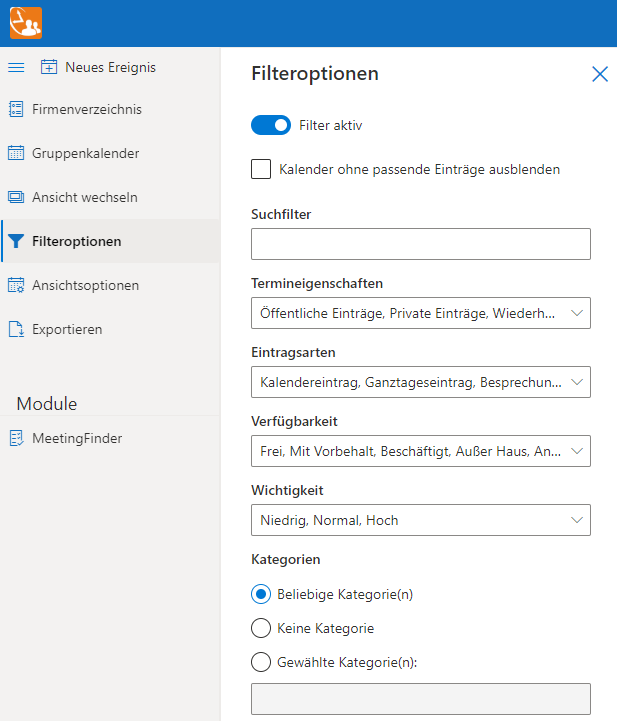
Wide array of filter functions
As an administrator, you can supply all your departments with predefined group calendars in an instant. In parallel, users can design their own personal calendars to include their preferred people, rooms and resources, as well as view and filter options.
The diverse range of options in the Group Calendar provides you with an immediate overview, for example, of home office, holidays, projects and room occupancy. Different views provide you with a detailed view ranging from a day through to weeks and months.

Always up-to-date
In parallel, access can also be provided over the TimeFleX Group Calendar, which allows for a higher level of detail.
If you wish, our integrated workflow will also notify you by email of any change, addition or deletion that a person makes to your calendar.
"Integration of the Fluent UI means that TimeFleX Solutions will remain identical to the look and feel of Microsoft products in future."
Easy to use thanks to Fluent UI
The adaptation to the Microsoft Fluent UI provides the user with an almost identical application as in the Outlook group calendar. This provides users with have a seamless transition to the application due to the high recognition value.
Clear structure of the user interface


You too can discover the diverse range of options offered by TimeFleX Solutions
Do you have any questions concerning our product?
Then talk to us today!We would also be delighted to demonstrate the features of our solution in detail in a webinar and answer any questions you may have in person.
FAQ about the group calendar
What are the benefits of a group calendar?
Efficient coordination: A group calendar allows team members to plan and coordinate appointments and events centrally. This facilitates the efficient use of resources and enables scheduling conflicts to be identified at an early stage.
Transparency: Team members have a clear overview of the group's planned activities and events. This promotes transparency and facilitates the planning of meetings and other activities.
Collaboration: A team calendar promotes collaboration, as team members can plan appointments and events together. It also facilitates communication about planned activities and ensures that everyone involved is on the same page (in real time).
Automated notifications: Automated notifications about calendar entries that have been created, changed, or deleted.
Resource management: When planning meetings or events, group calendars can also take into account the availability of resources such as meeting rooms or equipment. This facilitates the efficient management of shared resources.
The combination of these advantages and many more help to improve team coordination, increase productivity, and facilitate communication within the group.
How do you set up a group calendar?
Setting up a group calendar begins with selecting a suitable platform or application that meets the needs of your group. Popular digital options include Google Calendar, Microsoft Outlook, and Apple Calendar. After selecting the platform, an administrator creates the calendar and then invites all group members to participate. It is important that all members are given access permissions that suit their needs, whether as viewers or as people who can add and edit appointments.
Key information:
- Select a platform that suits the team's needs.
- An administrator creates the calendar and invites members.
- Access permissions must be distributed according to the needs of the group.
How can appointments be effectively coordinated in the group calendar?
Effective scheduling in a group calendar requires clear communication and rules. It is advisable to establish guidelines for the type of events that should be added and how details such as time, location, and description should be specified. In addition, using color codes for different types of events or for different group members can help keep the calendar clear and understandable. Regular reviews and updates of the calendar are also important to ensure that all information is up to date.
Key information:
- Clear communication and guidelines for adding events.
- Use of color codes to distinguish between event types or members.
- Regular review and updating of the calendar.
What challenges can arise when using a group calendar?
Challenges associated with using a group calendar can include overload with too many details, different access permissions, and the integration of individual calendars. Too many entries can make it difficult to find important information quickly, while different access rights can lead to confusion about who is authorized to make changes. Synchronizing individual calendars with the team calendar can also be a challenge, especially when different platforms are used.
Key information:
- Risk of overload due to too many entries.
- Management of different access permissions.
- Integration and synchronization with individual calendars.
How can the use of a group calendar be optimized?
Optimizing the use of a group calendar requires regular maintenance and adaptation to the changing needs of the group. A best practice approach is to regularly review calendar entries to remove outdated or no longer relevant appointments. Establishing a “calendar champion” within the group who is responsible for monitoring and updating the calendar can also be helpful. In addition, regular feedback sessions with group members can help identify and implement opportunities for improvement.
Key information:
- Regular maintenance and adaptation of the calendar.
- Establishment of a responsible “calendar champion.”
- Conducting feedback sessions for continuous improvement.