

This is how desk scheduling works today
TimeFleX Desk Sharing
Our Desk Sharing module offers you a modern solution for booking desks. You can find and book the right desk in seconds per browser, Outlook plug-in, Teams plug-in or mobile.





TimeFleX - Desk Sharing
To make optimal use of office space nonetheless, companies rely on a desk sharing solution that centrally manages bookings, occupancy and rules.
With the Desk Sharing module, TimeFleX Solutions offers exactly this solution – structured, organised and easy to plan. The focus is on user-friendliness (usability), effectiveness (time savings) and flexibility (location independence).

The advantages of Desk Sharing
- Employer branding & image
Boost staff loyalty to your organisation - Maximum Productivity
Structured booking software allows for time-saving bookings - Comprehensive role system
"Who" can book "when", "where" and "which" desk and "how often" - Optional check-in function
Via NFC/RFID, QR code or NFC tag in the web app (PWA) – or automatically via sensor
- Filter by feature
Use the filter function to find the most suitable desk - Boost to internal synergies
The exchange with colleagues means that new ideas can develop - Desk booking analysis
Instant analysis of the floor occupancy rate - Employee Satisfaction
A flexible working model that boosts workforce satisfaction
In a zone, different booking policies and booking groups can be assigned to desks. Booking policies might include the following, for example: Check-in, maximum lead time for bookings, number of bookings per week per user and much more.
Booking groups define access to zones, taking into account the booking policies for persons and groups.
Users also have the option to filter the desks according to certain equipment features in order to find the best suitable desk.

New at TimeFleX: workspace sensors for automatic check-in
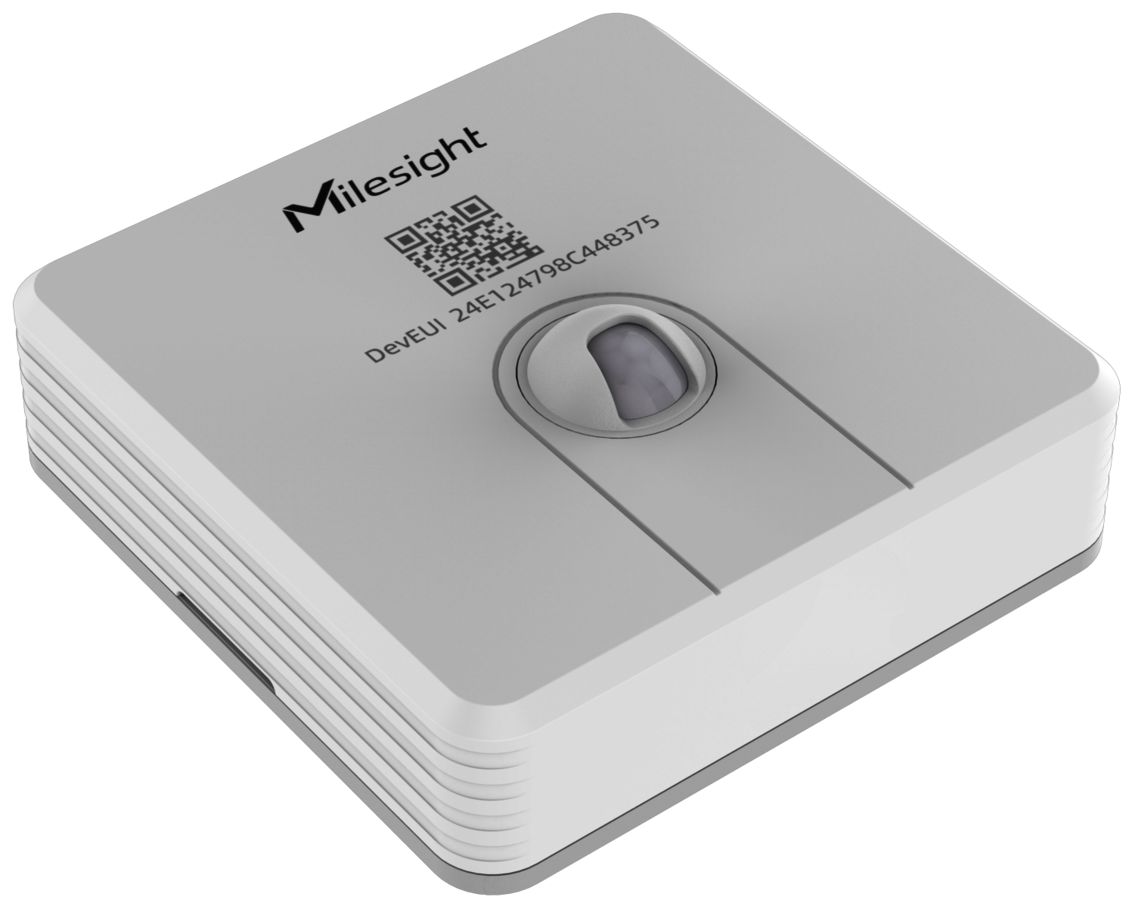
VS340
- Technology: motion sensor
- Dimensions: 73 x 73 x 26 mm
- Protocol: LoRaWAN®, Milesight D2D
- Battery: 1 x 4000 mAh ER18505 Li-SOCl2 battery
- Battery life: up to 5 years
- Colour: white + grey
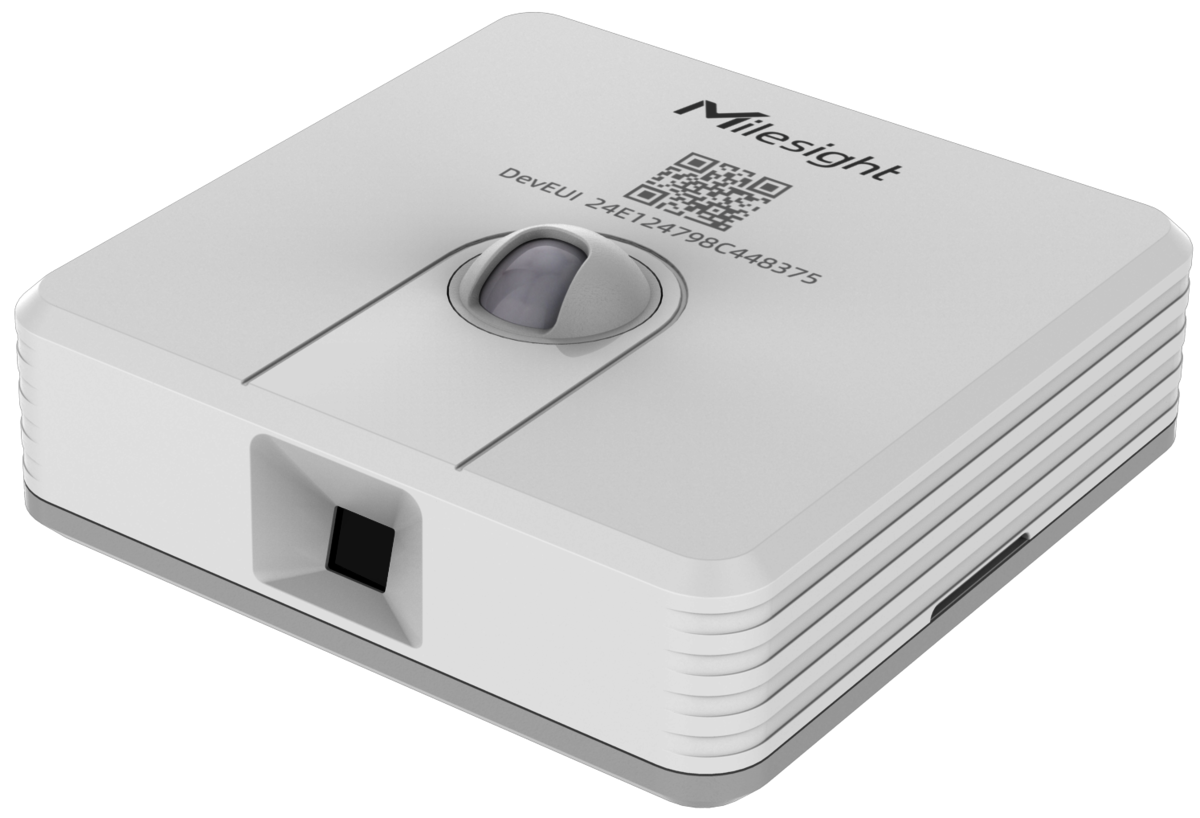
VS341
- Technology: motion sensor & thermal imaging camera
- Dimensions: 73 x 73 x 26 mm
- Protocol: LoRaWAN®, Milesight D2D
- Battery: 1 x 4000 mAh ER18505 Li-SOCl2 battery
- Battery life: up to 5 years
- Colour: white + grey
Our sensors detect in real time whether a desk is actually being used. No more manual check-in – and much more precise analyses of space utilisation.
Key benefits
- Automatic check-in: users no longer have to think about the web or app – the system does it automatically.
- Reliable occupancy instead of just booking data: identify no-shows and actual occupancy per zone, floor and site.
- Seamless administration: sensors are configured centrally in the admin area and assigned to individual desks.
- Better user experience: fewer clicks, less friction – just sit down and work.
- Data protection with a sense of proportion: only the occupancy status of the desk is recorded – no audio/video data.
Optional hardware support

Luminen 8
- Size: 8"
- Resolution: 1280 x 800
- Touch-capable: Yes, multi-touch
- Network: Wi-Fi, PoE
- NFC: Yes (13.56 MHz only)
- LED: 2 x status LEDs in 255 colours
- Dimensions (W x D x H): 213.2 mm x 127.6 mm x 27.5 mm

Luminen 5
- Size: 5"
- Resolution: 1280 x 720 (portrait mode) or 720 x 1280
- Touch-capable: Yes, multi-touch
- Network: Wi-Fi, PoE
- NFC: No
- LED: 2 x status LEDs in 255 colours
- Dimensions (W x D x H): 80.8 mm x 143.4 mm x 24.8 mm

TD-0360
- Size: 3.6" LCD screen
- Resolution: 480 x 480
- on-cell touch and 350 nits
- Touch-capable: Yes
- WLAN: WiFi 5
- NFC: Yes
- IO port: x1, Power-in; x1, ADB function
- LED: Status LED lights up in 255 colours
- Dimension: 90 mm x 90 mm x 13mm (3.54”x 3.54” x 0.51”)

Service Terminal
- Size: 32" monitor
- Resolution: 1920 x 1080
- Format: 16:9
- Configurable in colour including company branding
- Touch-capable: Yes
- NFC: Yes
- Media outlet box: HDMI outlet: 1 x HDMI 1.4b
HDCP support
Fanless solid-state design
LAN and Wi-Fi - LED: Front status LED
A more attractive employer
Another positive aspect for organisations is the boost to their attractiveness in the employment market through the introduction of desk sharing and the associated option for "hybrid working".
On top of that, many people associate desk sharing with agility and a modern working environment. Desk sharing can also make a positive contribution to employer branding & image.
These are just a few of the features that make TimeFleX Solutions so special. Experience the advantages of our Desk Sharing module in a one-on-one webinar and ensure more structure, flexibility, effectiveness and acceptance with TimeFleX Desk Sharing on your path to the new world of work.
Desk Sharing views


You too can discover the diverse range of options offered by TimeFleX Solutions
Do you have any questions concerning our product?
Then talk to us today!We would also be delighted to demonstrate the features of our solution in detail in a webinar and answer any questions you may have in person.
The comprehensive guide to the flexible workplace of the future
What is desk sharing? – Definition and basic principle
Desk sharing describes a modern workplace concept in which employees no longer have a permanently assigned desk. Instead, they use different workstations in the office depending on their needs and availability. Think of it like a café: in the morning you simply choose the seat that suits you best that day. This flexible principle is exactly what desk sharing is about – just in everyday office life.
Origin and development of desk sharing
Desk sharing is by no means a short-lived trend. The idea emerged back in the 1990s, when companies began to think about using office space more efficiently. With increasing digitalisation, mobile devices and cloud technologies, the concept gained enormous momentum. Today, in the age of working from home and hybrid working models, desk sharing is experiencing its real breakthrough.
Distinction from related concepts
Desk sharing is often confused with hot desking. The difference? While hot desking usually means workstations are used completely freely and without rules, desk sharing is based on clear structures, booking systems and fixed guidelines. Activity-based working goes one step further by designing workstations according to the activity (focus, meetings, creative work).
Why desk sharing is becoming more and more important
New work, remote work and hybrid working models
The world of work has changed radically. Employees no longer work exclusively from 9 to 5 in the office. Working from home, mobile working and hybrid models have become the norm. So why pay for empty desks? Desk sharing is the logical answer to this new reality – flexible, efficient and future-oriented.
Impact of digitalisation on workplaces
Thanks to laptops, cloud solutions and collaboration tools, the workplace is no longer tied to a fixed location. Everything you need fits into your backpack. This technological freedom is what makes desk sharing possible in the first place – and so attractive at the same time.
Benefits of desk sharing for companies
- Cost savings through reduced office space
One of the biggest advantages of desk sharing is obvious: lower costs. Companies can significantly reduce their office space, as a separate desk is no longer needed for every person. Less space means less rent, lower service charges and enormous savings in the long term.
- More efficient use of space
Empty offices are a thing of the past. Desk sharing ensures that existing space is used optimally. Rooms are occupied dynamically, bottlenecks are reduced and productivity increases. It is a bit like using a well-organised car park – always there when you need it.
- Promoting collaboration and innovation
When teams no longer always sit in the same place, new encounters arise. Employees from different departments get talking, ideas flow more freely and innovations emerge. Desk sharing acts as a social catalyst here.
- Sustainability and environmental aspects
Less space, less energy consumption, fewer resources – desk sharing supports sustainable corporate strategies. Especially for companies with ESG goals, this workplace model is a real lever.
Benefits of desk sharing for employees
- More flexibility and autonomy
Who likes to decide the same way every day? Desk sharing gives employees the freedom to choose their workstation depending on their mood, task or team. Sometimes quietly by the window, sometimes right in the middle of the action – you have the choice.
- Promoting communication and networking
Changing seats creates new contacts automatically. A quick chat at the coffee machine becomes an exchange of ideas, a spontaneous conversation the start of a project. Desk sharing gets social structures moving.
- Modern working environment and work-life balance
A flexible workplace model has a positive effect on satisfaction. Employees feel taken seriously, more modern and better balanced between work and private life.
Challenges and disadvantages of desk sharing
Lack of personal workstations
Not everyone loves change. For some employees, their own desk is an anchor point. Desk sharing can cause uncertainty here when personal belongings no longer have a fixed place.
Data protection and data security
Shared workstations require clear rules. Confidential documents must not be left lying around, screens must be locked. Without clear processes, desk sharing can quickly become a security risk.
Hygiene and cleanliness
Especially since the pandemic, hygiene has been a sensitive issue. Desk sharing only works with a consistent clean desk policy and regular cleaning.
Acceptance problems in the team
It doesn't work without communication. If desk sharing is imposed “from above”, it often meets with resistance. Transparency and participation are the key to success here.
Desk sharing at a glance – benefits, challenges and solutions
| Aspect | Description | Typical challenge | Proven solution / best practice |
|---|---|---|---|
| Workplace model | Flexible use of desks without fixed assignment | Uncertainty when choosing a seat | Introduction of a digital desk booking system |
| Use of space | Reduction of unused office space | Ratio too high or miscalculated | Analysis of attendance data & pilot phase |
| Costs | Savings on rent, energy and operating costs | Short-term investments (IT, conversion) | Long-term cost-benefit analysis |
| Employee satisfaction | More flexibility and self-determination | Loss of the feeling of a personal workplace | Locker systems & personal storage solutions |
| Collaboration | Promotion of exchange and cross-departmental communication | Lack of team belonging | Zones for teams & fixed meeting areas |
| Hygiene & tidiness | Shared use requires clear rules | Untidy or unhygienic workstations | Clear clean desk policy & regular cleaning |
| Data protection & security | Protection of sensitive data at changing workstations | Unlocked screens or documents left behind | Training, automatic screen locks |
| Technical equipment | Uniformly equipped workstations | Technical faults or missing connections | Standardised docking stations & support |
| Corporate culture | Strengthening trust and personal responsibility | Resistance to change | Transparent communication & employee involvement |
| Future viability | Adaptable to hybrid working | Lack of a long-term strategy | Desk sharing as part of the new work strategy |
Step-by-step guide
1. Analysis of the status quo
Before you start, analyse the current use of office space. How many employees are actually in the office at the same time? Which ways of working dominate?
2. Involving employees
Get your team on board early. Workshops, surveys and open conversations help to understand concerns and build acceptance.
3. Choosing suitable desk sharing software
A digital booking system is the heart of desk sharing. It ensures transparency and planning security and prevents chaos.
4. Designing the office space
Different zones for focused work, meetings and creative tasks are essential. A one-size-fits-all office rarely works.
5. Clear rules and guidelines
Define binding rules: booking times, clean desk policy, behaviour in the office. Clarity creates security.
6. Pilot phase and optimisation
Start small, collect feedback and optimise continuously. Desk sharing is a process, not a one-off project.
Best practices & tips for successful desk sharing
- Clean desk policy
A tidy workstation is a must. Anything that is not needed is cleared away. That way everyone feels welcome.
- Locker and storage concepts
Personal lockers provide security and replace the classic desk pedestal.
- Ergonomics and technical equipment
Every workstation should be ergonomically adjustable and fully equipped technically. Nobody wants to search for cables first thing in the morning.
- Making optimal use of desk booking systems
Use data from the booking system to further optimise space and identify bottlenecks at an early stage.
Which companies is it suitable for?
Start-ups and SMEs
Young companies in particular benefit from flexibility and cost efficiency. Desk sharing often grows naturally with them.
Large enterprises
Corporations are also increasingly relying on desk sharing, especially as part of global new work strategies.
Industry comparison
IT, consulting, agencies – wherever people work on the move, desk sharing unfolds its full potential.
Trends and developments
Smart offices and IoT
Sensors measure occupancy, light and climate adjust automatically. The office thinks along with you.
AI-supported desk booking
In future, artificial intelligence will suggest the ideal workstation for you – based on your calendar and working style.
Desk sharing as part of the corporate culture
Desk sharing is more than a space concept. It becomes an expression of an open, flexible and modern corporate culture.
Desk sharing as the key to the working world of tomorrow
Desk sharing is not a short-term trend, but a sustainable answer to the changing demands of the modern working world. It saves costs, promotes collaboration and gives employees more flexibility. Implemented correctly, desk sharing becomes a real competitive advantage – for companies and teams alike.
Frequently asked questions (FAQs) about desk sharing
Desk sharing is attractive for many companies, but not automatically the right choice for every organisation. It is particularly suitable for companies with hybrid working models, home office arrangements or a high proportion of field staff. When employees regularly work on the move or remotely, many desks are left empty – this is where desk sharing delivers its greatest benefit.
The model is less suitable for companies with a permanently high attendance requirement, sensitive data or highly individualised workstations, for example in laboratories or healthcare. What matters is always an individual analysis of working methods, corporate culture and processes before desk sharing is introduced.
The number of workstations required depends heavily on how many employees are actually present in the office. In practice, companies often only need 60 to 80 per cent as many desks as they have employees.
An example: if many employees regularly work from home or are often in meetings or out in the field, the simultaneous demand for workstations falls significantly. It is important not to estimate this ratio, but to determine it on the basis of usage data, observations or pilot projects. This prevents bottlenecks and frustration.
Yes, in almost all cases desk sharing software is a key success factor. Without a digital booking system, chaos quickly ensues: double-booked workstations, uncertainty when looking for a seat or unnecessary loss of time.
Modern desk booking systems allow employees to reserve their workstation in advance, view availability and even save favourite seats. For companies, these tools provide valuable occupancy data that can be used to continuously optimise office space. In short: desk sharing works without software – with software it works well.
Resistance is completely normal when introducing desk sharing, because change always affects habits too. Many employees worry about losing their personal workstation or about a lack of stability in their day-to-day work.
The most important key to acceptance is early and transparent communication. Employees should be actively involved in the process – for example through workshops, surveys or trial phases. Pilot projects help to gather experience and reduce fears. When teams realise that their needs are taken seriously, acceptance rises significantly and desk sharing is seen not as an obligation but as an opportunity.
The biggest success factor for desk sharing is not the technology, but the corporate culture. Clear rules, mutual consideration and trust are crucial. A consistent clean desk policy, ergonomically equipped workstations and sufficient storage space create the necessary framework.
At the same time, desk sharing must be understood as part of a modern working culture that promotes flexibility, personal responsibility and collaboration. Companies that not only introduce desk sharing but actively live it and continuously develop it benefit in the long term from greater satisfaction, better use of space and a future-proof working environment.

Desk sharing vs. traditional office
| Criterion | Desk sharing | Traditional office with fixed workstations |
|---|---|---|
| Workplace model | No fixed desk, flexible choice of seat as required | Fixed, personally assigned workstation |
| Use of space | Very efficient, as not all employees are in the office at the same time | Often inefficient due to many unused desks |
| Cost structure | Lower rent, energy and operating costs | Higher fixed costs due to larger office space |
| Suitability for hybrid working | Ideal for home office and hybrid models | Less suitable for flexible working models |
| Employee autonomy | High – employees decide on their workstation themselves | Low to medium – few individual choices |
| Collaboration & exchange | Promotes spontaneous communication and cross-departmental exchange | Exchange usually limited to fixed teams |
| Identification with the workplace | Lower, as there is no personal desk | High thanks to personal design |
| Tidiness & cleanliness | High level of discipline required (clean desk policy) | Personal tidiness, often regulated individually |
| Data protection & IT security | Requires clear rules and training | Easier to implement thanks to fixed use |
| Technical equipment | Uniformly standardised workstations required | Individual equipment per workstation |
| Scalability | Very easy to scale with growth or restructuring | Limited, often complex conversions required |
| Corporate culture | Modern, open, trust-based | Traditional, stable, structure-oriented |
| Employee acceptance | Depends on communication & change management | Usually high out of habit |
| Future viability | Very high – adapted to new work & digitalisation | Declining as flexibility increases |
Brief conclusion on the comparison table
While the traditional office scores above all with stability and personal identification, desk sharing convinces with flexibility, cost efficiency and future viability. Especially in times of home office, remote work and hybrid working models, desk sharing proves to be the more modern and sustainable solution for many companies – provided it is planned strategically and accompanied culturally.
The role of desk sharing software
In practice, desk sharing only works with suitable software.
Desk sharing software takes on the following tasks:
- Booking and reserving workstations
- Displaying availability in real time
- Integration into existing calendars such as Microsoft Outlook
- Analysis of workstation usage
- Automatic release of unused desks (no-show management)
Without a digital solution, problems quickly arise, such as:
- Double bookings
- Uncertainty among employees
- Inefficient use of space
That is why a software solution such as the one from TimeFleX Solutions is the key success factor for desk sharing that works.
Is desk sharing the right model for my company?
Introducing desk sharing is not purely a decision about space – it affects processes, culture and everyday work. The following decision guide helps you to check in a structured and honest way whether desk sharing suits your company or whether adjustments are needed.
1. Working methods and presence in the office
Key question: Are all employees present in the office at the same time every day?
⬜️ Yes, almost all employees are on site every day
✅ No, many work from home, on the move or in the field
👉 Assessment:
Desk sharing is particularly suitable if not all employees are present at the same time. With hybrid working models, desks would otherwise remain permanently unused – clear potential for desk sharing.
2. Type of activities
Key question: Can the work mostly be done digitally and on the move?
✅ Yes, we mainly work with laptops, cloud tools and digital documents
⬜️ No, many workstations are highly individualised or stationary
👉 Assessment:
The more digital and mobile the work, the easier it is to implement desk sharing. Highly specialised workstations (e.g. with special hardware) are less suitable.
3. Corporate culture and openness to change
Key question: How open is your organisation to change?
✅ Open, flexible and innovation-oriented
⬜️ Strongly tradition- or hierarchy-oriented
👉 Assessment:
Desk sharing works particularly well in companies with a culture of trust, personal responsibility and open communication. Very rigid structures require intensive change management.
4. Technical requirements
Key question: Is the technical infrastructure for flexible workstations in place?
✅ Laptops, VPN, cloud systems and collaboration tools are standard
⬜️ Stationary computers and local systems dominate
👉 Assessment:
Without a modern IT infrastructure, desk sharing quickly becomes frustrating. Uniformly equipped workstations are a basic requirement for smooth processes.
5. Leadership and management
Key question: Is leadership defined more by results than by presence?
✅ Results-oriented leadership is established
⬜️ A culture of presence still plays a major role
👉 Assessment:
Desk sharing requires trust instead of control. Managers must actively support flexible working models and lead by example.
6. Office space and cost structure
Key question: Is there potential for optimising office space and costs?
✅ Yes, there are many unused workstations
⬜️ No, all space is permanently in use
👉 Assessment:
If office space is regularly empty, desk sharing is an effective lever for cost reduction and space optimisation.
7. Willingness to introduce clear rules
Key question: Is the company willing to establish binding rules?
✅ Yes, clear guidelines are accepted and lived
⬜️ No, rules often meet with resistance
👉 Assessment:
Desk sharing needs clear rules such as a clean desk policy, booking rules and data protection guidelines. Without them, acceptance suffers.
Quick check: your evaluation
- Mostly ✅? → Desk sharing is very well suited
- Mixed answers? → Desk sharing is possible, but with adjustments
- Mostly ⬜️? → A traditional office or hybrid model makes more sense
Recommendation: how companies get off to a successful start
If desk sharing is basically a good fit, we recommend:
- A pilot project with selected teams
- Introducing desk sharing software
- Involving employees early on
Continuous optimisation based on usage data
Conclusion of the decision guide
Desk sharing is not a “one-size-fits-all” model. It works best where flexible working methods, digital processes and an open corporate culture already exist or are being consciously developed. Those who introduce desk sharing strategically and accompany it culturally lay the foundation for a modern, efficient and future-proof working world.